Introduction
A supplier goes bankrupt overnight, a flood shuts down your warehouse, or your only laptop with the accounts crashes — and suddenly you realize you never had a real business continuity plan. Most small business owners think continuity planning is something only big corporations need, but it’s usually the smaller companies that go under after a single disruption because they had no backup plan at all. This guide breaks down what a workable continuity plan actually looks like, without the corporate consultant price tag.
What a Business Continuity Plan Actually Covers
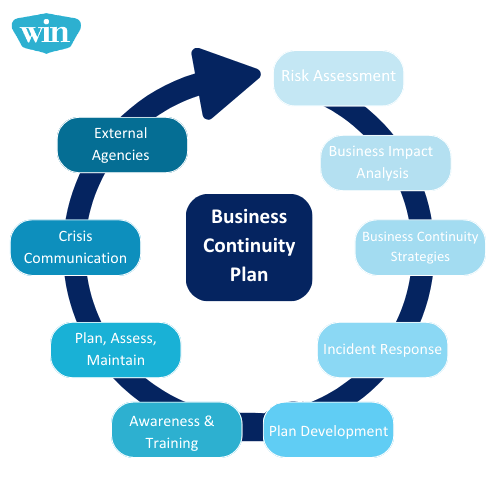
A business continuity plan isn’t just an IT backup strategy — it’s a full playbook for keeping your operations running (or restarting quickly) after any disruption, whether that’s a cyberattack, a natural disaster, or losing a key employee.
It typically covers four things: risk identification, critical function mapping, recovery procedures, and communication plans. Skipping any one of these leaves a gap that shows up exactly when you can least afford it.
Step 1: Identify What Could Actually Go Wrong
Start by listing realistic risks specific to your business — not generic ones copied from a template. A textile exporter in Surat worries about power cuts and shipping delays; a SaaS startup worries about server downtime and data breaches.
Rank each risk by two factors: how likely it is, and how much damage it would cause. Focus your planning effort on the top 3-5 risks first rather than trying to cover everything at once.
Step 2: Map Your Critical Business Functions
Not every part of your business needs to be back up within an hour. Figure out which functions are truly critical — usually things like payment processing, customer communication, and core service delivery — versus things that can wait a few days, like internal reporting.
Quick answer: Critical function mapping means ranking every business process by how quickly its failure would hurt revenue or customers, so you know exactly what to restore first during a disruption instead of guessing under pressure.
Step 3: Build Redundancy Into Your Systems
- Keep at least one cloud backup of all financial and customer data (not just local drives)
- Maintain a secondary supplier relationship for critical materials
- Have a backup payment gateway in case your primary one goes down
- Cross-train at least one other employee on every critical task
Small businesses that rely on a single supplier, single server, or single person for anything critical are one bad week away from a serious problem.
Step 4: Create a Communication Plan
When something goes wrong, silence is what damages customer trust the most — not the disruption itself. Draft communication templates in advance for employees, customers, and vendors, so you’re not writing them from scratch during a crisis.
A well-prepared company can usually get a customer-facing update out within 2-4 hours of an incident; without a plan, that often stretches to 24-48 hours, by which point customers have already started looking elsewhere.
Step 5: Test the Plan Before You Need It
A business continuity plan that’s never been tested is just a document. Run a simple tabletop exercise every 6 months — pick one scenario (like “our main supplier suddenly can’t deliver”) and walk through your response as a team.
Quick answer: Testing a continuity plan means simulating a specific disruption on paper or in a short drill, then checking whether your team actually knows their role — most gaps in a plan only surface once you try to act on it.
Budgeting for Continuity Without Overspending
You don’t need enterprise-grade disaster recovery software as a small business. Cloud backups (₹500-2,000/month for most small operations), a secondary supplier relationship, and basic cyber insurance usually cover 80% of the risk at a fraction of enterprise cost.
[link to related guide on small business risk management here]
Reviewing and Updating the Plan Regularly
Your risks change as your business grows — a plan built for a 5-person team doesn’t fit a 30-person company. Review and update your continuity plan at least once a year, or immediately after any major operational change like a new office or new core system.
FAQs
Q1: What’s the difference between a business continuity plan and a disaster recovery plan? Disaster recovery focuses specifically on restoring IT systems and data. Business continuity is broader — it covers people, processes, suppliers, and communication, not just technology.
Q2: How much does a business continuity plan cost for a small business? For most small businesses, building the plan itself costs nothing beyond time; the ongoing cost (cloud backups, insurance) usually runs ₹1,000-5,000 per month depending on scale.
Q3: Do small businesses really need a continuity plan? Yes — studies consistently show small businesses without a plan are far less likely to fully recover after a major disruption compared to those with even a basic plan in place.
Q4: How often should I test my continuity plan? Twice a year is a reasonable minimum, with a full review after any major business change.
Q5: Who should be responsible for the continuity plan in a small company? Usually the owner or a senior manager, but every team lead should know their specific role within it.
Q6: What’s the first thing I should do to start planning? List your top 5 realistic risks and identify which business functions would hurt the most if disrupted — that alone puts you ahead of most small businesses.
Conclusion
A solid business continuity plan doesn’t need to be a 50-page corporate document — it needs to be realistic, tested, and specific to your actual risks. Start small: identify your top risks this week, write down who does what if things go wrong, and build from there. The businesses that survive disruptions aren’t the ones with the fanciest plans — they’re the ones that actually wrote something down before they needed it.
Suggested Alt Text: “Small business team reviewing a business continuity and risk plan on a whiteboard”